

Custom SIP Trunks
Custom SIP trunks allow you to import your own phone numbers to Diga, maintaining full control over your telephony infrastructure while leveraging the capabilities of intelligent voice agents.Overview
What is a SIP Trunk?
A SIP trunk is an IP telephony connection that allows you to make and receive calls using the SIP (Session Initiation Protocol) protocol. With custom SIP trunks, you can:- Import existing numbers: Bring your current numbers to Diga
- Keep your provider: Continue working with your current operator
- No additional billing: Diga does not charge for custom numbers
- Full control: Manage your SIP configuration
Prerequisites
Before importing a custom number, make sure you have:1
Number in E.164 format
Your number must be in international E.164 format (e.g.: +34912345678)
2
Configured SIP provider
You need an active SIP provider that supports:
- Inbound calls
- Outbound calls
3
SIP credentials (for outbound calls)
To make outbound calls and call transfers, obtain from your provider:
- SIP trunk username
- SIP trunk password
- Termination URI (entered in the Address field)
If you don’t have a SIP provider or are not familiar with technical configuration, consider buying phone numbers on the platform for a simplified experience.
Import a Custom Number
The import form (“Connect your number via SIP trunk”) is organized into three tabs:- General: number and routing settings shared by inbound and outbound calls.
- Incoming configuration: settings that apply to inbound calls.
- Outgoing configuration: credentials and the address used for outbound calls.
Outbound configuration (the SIP trunk credentials and the address) is optional. If you leave it empty, the number is inbound-only. You must fill it in to make outbound calls and to use call transfers.
General
Phone Number
The number you are importing in international E.164 format (e.g.+34675897654). This field also accepts a SIP user identifier (e.g. user@domain.com).
Media encryption
Controls SRTP encryption for media streams. Choose one of:- Disabled: media is not encrypted.
- Allowed (default): media is encrypted when the other side supports it.
- Required: media must be encrypted.
Allowed IP Addresses
A list of IP addresses or CIDR ranges allowed to send calls to this trunk (e.g.192.168.1.0/24). Leave it empty to allow all addresses.
Outgoing configuration
SIP Trunk Username (Optional)
Your user identifier provided by the SIP provider, used for digest authentication. Example:user123 or my-company
SIP Trunk Password (Optional)
The password to authenticate outbound calls with your provider.Address
The hostname or IP of your provider’s SIP server where SIP INVITEs are sent for outbound calls. This is your provider’s termination URI. Typical format:[hostname-or-ip]:[port]
Examples:
my-termination.example.com:5060trunk.example.net:5061
If you are unsure of these values, contact your SIP provider. This information is usually available in your SIP service control panel.
Managing Custom Numbers
View Custom Numbers
Custom numbers appear in your number list along with Diga numbers, but are clearly identified in the provider column as “Custom”.Delete a Custom Number
You can delete custom numbers the same way as numbers purchased through the platform. To do so, click the view button in the phone numbers table.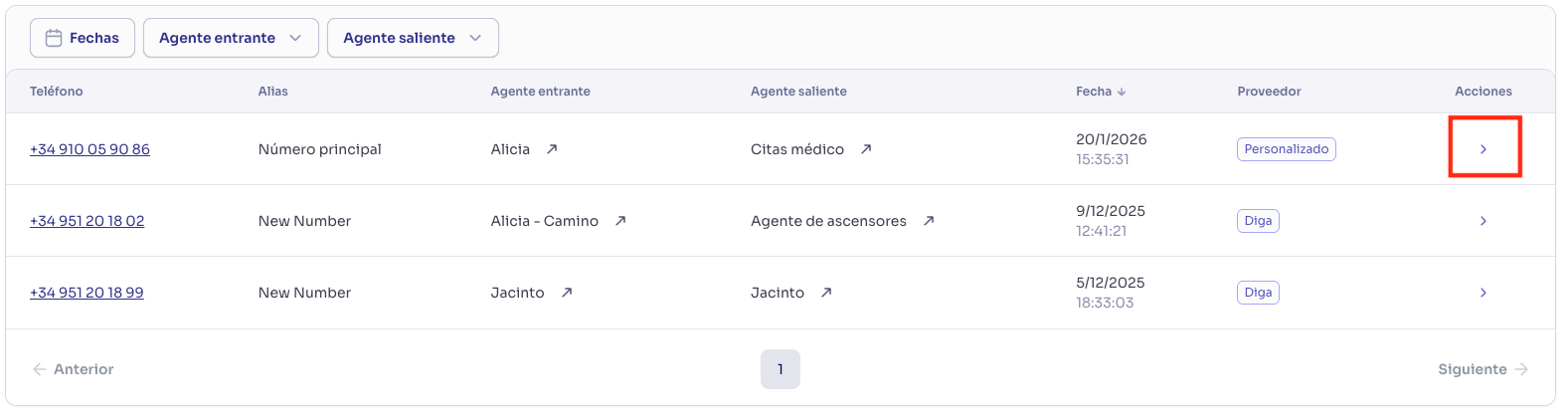
Billing
No Charges in Diga
Custom numbers do not generate charges on your Diga invoice:- No monthly fee per number
- No setup charges
- No call charges (you pay directly to your SIP provider)
Costs with your SIP Provider
Your SIP provider may charge you for:- Monthly number rental
- Inbound calls
- Outbound calls
- SIP trunk configuration
Review billing terms directly with your SIP provider, as Diga does not manage these payments.
Minutes Usage
Calls made with custom numbers do consume minutes from your Diga plan:- Minutes count the same as with Netelip numbers
- Applied to your monthly minute allocation
- If you exceed your plan, additional minutes are charged (if enabled)
Only the number itself is free in Diga. Call time still consumes your minutes included in your subscription plan.
Troubleshooting
Inbound calls don’t work
Possible causes:- Your SIP provider is not forwarding calls to Diga
- Allowed IP Addresses are blocking your provider
- No agent assigned for inbound calls
- Contact your provider to verify forwarding to
sip.diga.io - Make sure your provider’s IPs are included in Allowed IP Addresses (or leave the list empty to allow all)
- Assign an agent for inbound calls
Outbound calls fail
Possible causes:- Outgoing configuration (credentials and Address) is empty or incorrect
- The Address still includes a
sip:/sips:prefix - Your SIP provider does not allow outbound calls
- Provider restrictions (allowed destinations, limits, etc.)
- No agent assigned for outbound calls
- Fill in the Outgoing configuration tab (SIP trunk username, password, and Address)
- Make sure the Address has no
sip:/sips:prefix and no spaces - Verify that your SIP trunk supports outbound calls
- Review your provider’s outbound call policies
- Assign an agent for outbound calls
Error importing the number
Possible causes:- Incorrect number format (not E.164)
- The number is already imported in another project
- Invalid SIP credentials
- Make sure to use E.164 format with + at the beginning
- Verify that the number is not in use in another project
- Confirm that the credentials are correct
Poor call quality
Possible causes:- Issues with your SIP provider
- Network latency
- Incompatible codec configuration
- Contact your SIP provider to verify quality
- Verify network connectivity
- Consult with your provider about supported codecs