> ## Documentation Index
> Fetch the complete documentation index at: https://docs.diga.io/llms.txt
> Use this file to discover all available pages before exploring further.
# Buy Phone Numbers
> Purchase and manage phone numbers for your voice agents
## Phone Numbers
Phone numbers allow your voice agents to receive and make calls. In this section, we explain how to purchase numbers directly from Diga, so you don't have to manage telephony infrastructure.
We currently only offer Spanish phone numbers, and calls are only allowed to national numbers. If you want to make requests for other countries, check the [Configure custom number](/en/telephony/sip-trunks) section.
## Buy Phone Numbers
Go to **Phone Numbers** and click "Buy number". Select the area code and the number of numbers you need.
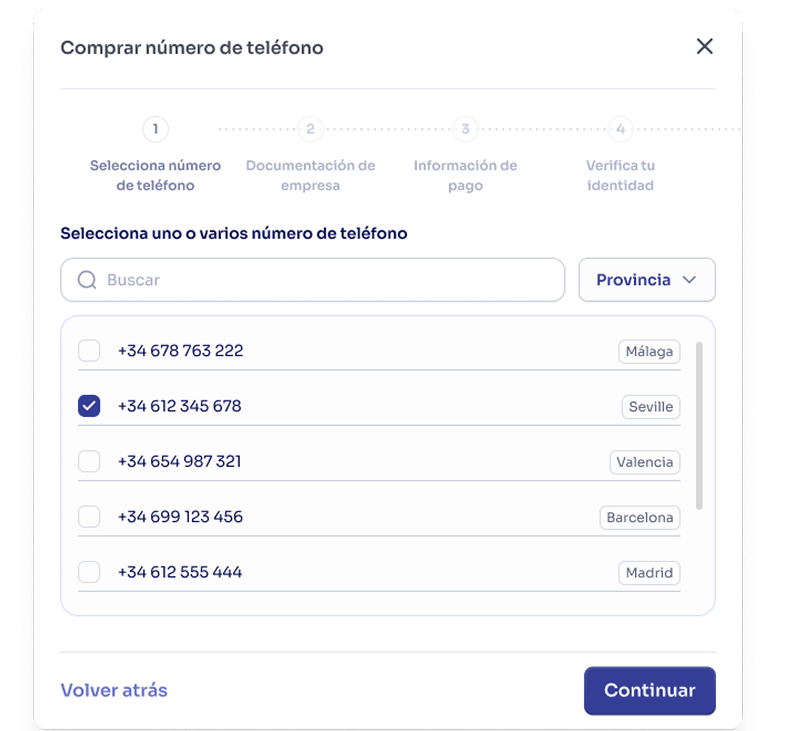 You will be redirected to Stripe to process the payment securely. The numbers will be reserved for your project.
If this is your first purchase, you must complete the identity verification process before the numbers are activated. You have 24 hours to complete this step.
Once active, assign agents to your numbers so they can receive and make calls.
Numbers reserved during purchase will be kept on hold until identity verification is completed.
## Identity Verification
### Why is it Necessary?
Identity verification is a **regulatory requirement** to prevent fraud and comply with telecommunications regulations. It is only necessary for the first number purchase by each company.
### When is it Required
Verification is mandatory in these cases:
* **First number purchase**: New companies purchasing their first number
* **No previous verification**: If your company never completed verification
Companies already verified can purchase additional numbers without additional verification.
### Verification Process
The Veriff service will be used to complete identity verification. The process is as follows:
After making the payment, your numbers will be temporarily reserved.
A window will appear where you must start the process by choosing your document type.
Upload the required identity documents.
Veriff will review your documents. This process usually takes between a few minutes and 24 hours.
Once approved, your reserved numbers will be automatically activated.
### Verification States
Your verification can be in one of these states:
**Pending**
* Documents submitted, awaiting review
* You cannot purchase additional numbers during this period
* Purchased numbers remain reserved
**Verified**
* Successful approval
* Reserved numbers automatically activated
* You can purchase additional numbers without restrictions
**Rejected**
* Documents not approved
* Payment automatically canceled (you are not charged)
* Reserved numbers released
* You can try to verify again with correct documents
## Number Lifecycle
Phone numbers go through different states during their lifetime in your project.
### Number States
The number is temporarily assigned to your project during the purchase or verification process.
* Not yet active for calls
* Remains in this state during verification
* Automatically activated upon verification approval
The number is fully active and operational.
* You can assign agents for inbound and outbound calls
* Billed monthly (€1.95/month + VAT)
* Appears in your list of active numbers
You have released the number, but it is in a 30-day quarantine period.
* You cannot use it for calls
* Other customers cannot purchase it during this period
* Still visible in your panel (marked as "In quarantine")
* Agents are automatically unassigned
After quarantine, the number becomes available for purchase again.
### Quarantine Period
When you release a number, it enters a **30-day quarantine period** before being available to other customers.
**Why does quarantine exist?**
* Prevents recently released numbers from being immediately purchased by other companies
* Allows time for contacts to update their records
* Reduces confusion for customers who may have the number saved
During quarantine, the number can no longer be used for calls and is not billed. You cannot reactivate a released number. If you need to recover it, [contact support](https://www.diga.io/contact).
## Number Billing
### Monthly Cost
Each Diga phone number has a fixed cost:
* **€1.95 + VAT per number per month**
* Monthly billing independent of your subscription plan
* Charged along with your monthly minutes invoice
## Troubleshooting
### I cannot purchase additional numbers
**Cause**: Your company has a pending verification.
**Solution**:
* Complete the identity verification process
* Once approved, you can purchase additional numbers
### My payment was authorized but the numbers are not active
**Cause**: You have a pending identity verification.
**Explanation**:
* Payment is authorized but not captured
* Numbers are reserved awaiting verification
* They will be automatically activated upon verification approval
### My verification was rejected
**Solution**:
1. Review the reason for rejection in the Veriff email
2. Prepare valid and legible documents
3. Retry the verification process
4. The previous payment was canceled, you were not charged
### I released a number by mistake
Released numbers cannot be recovered. They enter a 30-day quarantine and then become available to other customers.
If you released a number by mistake:
* It is not possible to reactivate it
* You can purchase a different number immediately
* The released number will not be available to others until after 30 days
You will be redirected to Stripe to process the payment securely. The numbers will be reserved for your project.
If this is your first purchase, you must complete the identity verification process before the numbers are activated. You have 24 hours to complete this step.
Once active, assign agents to your numbers so they can receive and make calls.
Numbers reserved during purchase will be kept on hold until identity verification is completed.
## Identity Verification
### Why is it Necessary?
Identity verification is a **regulatory requirement** to prevent fraud and comply with telecommunications regulations. It is only necessary for the first number purchase by each company.
### When is it Required
Verification is mandatory in these cases:
* **First number purchase**: New companies purchasing their first number
* **No previous verification**: If your company never completed verification
Companies already verified can purchase additional numbers without additional verification.
### Verification Process
The Veriff service will be used to complete identity verification. The process is as follows:
After making the payment, your numbers will be temporarily reserved.
A window will appear where you must start the process by choosing your document type.
Upload the required identity documents.
Veriff will review your documents. This process usually takes between a few minutes and 24 hours.
Once approved, your reserved numbers will be automatically activated.
### Verification States
Your verification can be in one of these states:
**Pending**
* Documents submitted, awaiting review
* You cannot purchase additional numbers during this period
* Purchased numbers remain reserved
**Verified**
* Successful approval
* Reserved numbers automatically activated
* You can purchase additional numbers without restrictions
**Rejected**
* Documents not approved
* Payment automatically canceled (you are not charged)
* Reserved numbers released
* You can try to verify again with correct documents
## Number Lifecycle
Phone numbers go through different states during their lifetime in your project.
### Number States
The number is temporarily assigned to your project during the purchase or verification process.
* Not yet active for calls
* Remains in this state during verification
* Automatically activated upon verification approval
The number is fully active and operational.
* You can assign agents for inbound and outbound calls
* Billed monthly (€1.95/month + VAT)
* Appears in your list of active numbers
You have released the number, but it is in a 30-day quarantine period.
* You cannot use it for calls
* Other customers cannot purchase it during this period
* Still visible in your panel (marked as "In quarantine")
* Agents are automatically unassigned
After quarantine, the number becomes available for purchase again.
### Quarantine Period
When you release a number, it enters a **30-day quarantine period** before being available to other customers.
**Why does quarantine exist?**
* Prevents recently released numbers from being immediately purchased by other companies
* Allows time for contacts to update their records
* Reduces confusion for customers who may have the number saved
During quarantine, the number can no longer be used for calls and is not billed. You cannot reactivate a released number. If you need to recover it, [contact support](https://www.diga.io/contact).
## Number Billing
### Monthly Cost
Each Diga phone number has a fixed cost:
* **€1.95 + VAT per number per month**
* Monthly billing independent of your subscription plan
* Charged along with your monthly minutes invoice
## Troubleshooting
### I cannot purchase additional numbers
**Cause**: Your company has a pending verification.
**Solution**:
* Complete the identity verification process
* Once approved, you can purchase additional numbers
### My payment was authorized but the numbers are not active
**Cause**: You have a pending identity verification.
**Explanation**:
* Payment is authorized but not captured
* Numbers are reserved awaiting verification
* They will be automatically activated upon verification approval
### My verification was rejected
**Solution**:
1. Review the reason for rejection in the Veriff email
2. Prepare valid and legible documents
3. Retry the verification process
4. The previous payment was canceled, you were not charged
### I released a number by mistake
Released numbers cannot be recovered. They enter a 30-day quarantine and then become available to other customers.
If you released a number by mistake:
* It is not possible to reactivate it
* You can purchase a different number immediately
* The released number will not be available to others until after 30 days