> ## Documentation Index
> Fetch the complete documentation index at: https://docs.diga.io/llms.txt
> Use this file to discover all available pages before exploring further.
# Team
> Invite users to your project, manage their roles, and control access permissions.
# Team
From the Team section you can **invite users** to your project and **manage their permissions**. Each member has an assigned role that determines what actions they can perform within the project.
Access this section from **Settings > Project > Team**.
## Invite users
Only **administrators** can invite new users to the project.
In the upper right corner of the members table, click **Invite Users**.
Type the user's email address and select the role you want to assign (**Administrator**, **Member**, or **Reader**).
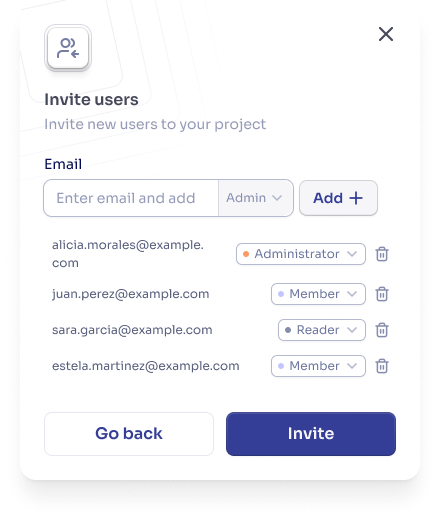 The user will receive an email with a link to join the project.
Once the invitation is accepted, the user will appear in the members table with the assigned role.
## Manage members
Administrators can perform the following actions on project members:
* **Change the role** of a member (between Administrator, Member, and Reader).
* **Remove** a member from the project.
To do this, use the **Actions** buttons in the corresponding row of the table.
You cannot demote or remove the **last administrator** of the project. There must be at least one administrator at all times.
## Roles and permissions
Diga uses a **role-based access control (RBAC)** model. Roles are assigned **per project**, meaning the same user can have different roles in different projects.
### Administrator
Full access to all project resources and settings.
* Agent management (create, modify, delete).
* Team member management (invite, change roles, remove).
* Phone number management (buy, configure, release).
* Billing and subscription management.
* API key and integration management.
* Full access to analytics and logs.
### Member
**Read-only** access to most resources, with the ability to operate existing agents.
* View agents and their configurations.
* Make calls with project agents.
* View calls, transcriptions, and recordings.
* View and create contacts.
* Access reports and statistics.
Members **cannot** create or modify agents, manage the team, access billing, or configure integrations or API keys.
### Reader
**Minimum read-only** access, limited to viewing analytics and call logs.
* View the home dashboard (general analytics).
* View call logs with transcriptions.
Readers **cannot** view agents, contacts, phone numbers, knowledge bases, or any other project section. This is the most restrictive role available.
### Detailed permissions
| Permission | Administrator | Member | Reader |
| ------------------------ | ------------- | ------ | ------ |
| View project information | ✓ | ✓ | ✗ |
| Update project details | ✓ | ✗ | ✗ |
| Delete project | ✓ | ✗ | ✗ |
| Permission | Administrator | Member | Reader |
| ------------- | ------------- | ------ | ------ |
| View agents | ✓ | ✓ | ✗ |
| Create agents | ✓ | ✗ | ✗ |
| Modify agents | ✓ | ✗ | ✗ |
| Delete agents | ✓ | ✗ | ✗ |
| Permission | Administrator | Member | Reader |
| ----------------------------- | ------------- | ------ | ------ |
| View home dashboard | ✓ | ✓ | ✓ |
| Access reports and statistics | ✓ | ✓ | ✓ |
| Permission | Administrator | Member | Reader |
| ---------------------------------- | ------------- | ------ | ------ |
| View calls | ✓ | ✓ | ✓ |
| View transcriptions and recordings | ✓ | ✓ | ✓ |
| Initiate calls | ✓ | ✓ | ✗ |
| Modify call metadata | ✓ | ✗ | ✗ |
| Delete call records | ✓ | ✗ | ✗ |
| Permission | Administrator | Member | Reader |
| ------------------ | ------------- | ------ | ------ |
| View phone numbers | ✓ | ✓ | ✗ |
| Buy new numbers | ✓ | ✗ | ✗ |
| Configure numbers | ✓ | ✗ | ✗ |
| Release numbers | ✓ | ✗ | ✗ |
| Permission | Administrator | Member | Reader |
| --------------- | ------------- | ------ | ------ |
| View contacts | ✓ | ✓ | ✗ |
| Create contacts | ✓ | ✓ | ✗ |
| Delete contacts | ✓ | ✗ | ✗ |
| Permission | Administrator | Member | Reader |
| ------------------ | ------------- | ------ | ------ |
| View team members | ✓ | ✗ | ✗ |
| Invite new members | ✓ | ✗ | ✗ |
| Change roles | ✓ | ✗ | ✗ |
| Remove members | ✓ | ✗ | ✗ |
| Permission | Administrator | Member | Reader |
| ------------------------ | ------------- | ------ | ------ |
| View billing information | ✓ | ✗ | ✗ |
| Manage subscription | ✓ | ✗ | ✗ |
| View invoices | ✓ | ✗ | ✗ |
| Permission | Administrator | Member | Reader |
| ------------------------------------- | ------------- | ------ | ------ |
| View API keys | ✓ | ✗ | ✗ |
| Create / modify / revoke keys | ✓ | ✗ | ✗ |
| View integrations | ✓ | ✗ | ✗ |
| Create / modify / delete integrations | ✓ | ✗ | ✗ |
### Which role to assign?
For those who need **full control**: business owners, project managers, technical administrators, or IT staff.
For those who need to **operate without modifying**: sales agents, support staff, or call center operators.
For those who only need to **review results**: supervisors, executives, or stakeholders who review metrics and call logs.
## Best practices
Assign users the minimum access level necessary. Start with the **Reader** role if they only need to view data, use **Member** if they need to operate, and elevate to **Administrator** only when essential.
Avoid depending on a single administrator. If that person is unavailable, no one will be able to manage the project.
Periodically audit who has access and remove members who no longer need it.
## FAQ
Per project. You can be an administrator in one project and a member in another.
Currently Diga offers three fixed roles: Administrator, Member, and Reader. Custom roles may be available in future versions.
You must promote another member to administrator before you can leave.
Yes, users receive a notification when their role changes in a project.
The user will receive an email with a link to join the project.
Once the invitation is accepted, the user will appear in the members table with the assigned role.
## Manage members
Administrators can perform the following actions on project members:
* **Change the role** of a member (between Administrator, Member, and Reader).
* **Remove** a member from the project.
To do this, use the **Actions** buttons in the corresponding row of the table.
You cannot demote or remove the **last administrator** of the project. There must be at least one administrator at all times.
## Roles and permissions
Diga uses a **role-based access control (RBAC)** model. Roles are assigned **per project**, meaning the same user can have different roles in different projects.
### Administrator
Full access to all project resources and settings.
* Agent management (create, modify, delete).
* Team member management (invite, change roles, remove).
* Phone number management (buy, configure, release).
* Billing and subscription management.
* API key and integration management.
* Full access to analytics and logs.
### Member
**Read-only** access to most resources, with the ability to operate existing agents.
* View agents and their configurations.
* Make calls with project agents.
* View calls, transcriptions, and recordings.
* View and create contacts.
* Access reports and statistics.
Members **cannot** create or modify agents, manage the team, access billing, or configure integrations or API keys.
### Reader
**Minimum read-only** access, limited to viewing analytics and call logs.
* View the home dashboard (general analytics).
* View call logs with transcriptions.
Readers **cannot** view agents, contacts, phone numbers, knowledge bases, or any other project section. This is the most restrictive role available.
### Detailed permissions
| Permission | Administrator | Member | Reader |
| ------------------------ | ------------- | ------ | ------ |
| View project information | ✓ | ✓ | ✗ |
| Update project details | ✓ | ✗ | ✗ |
| Delete project | ✓ | ✗ | ✗ |
| Permission | Administrator | Member | Reader |
| ------------- | ------------- | ------ | ------ |
| View agents | ✓ | ✓ | ✗ |
| Create agents | ✓ | ✗ | ✗ |
| Modify agents | ✓ | ✗ | ✗ |
| Delete agents | ✓ | ✗ | ✗ |
| Permission | Administrator | Member | Reader |
| ----------------------------- | ------------- | ------ | ------ |
| View home dashboard | ✓ | ✓ | ✓ |
| Access reports and statistics | ✓ | ✓ | ✓ |
| Permission | Administrator | Member | Reader |
| ---------------------------------- | ------------- | ------ | ------ |
| View calls | ✓ | ✓ | ✓ |
| View transcriptions and recordings | ✓ | ✓ | ✓ |
| Initiate calls | ✓ | ✓ | ✗ |
| Modify call metadata | ✓ | ✗ | ✗ |
| Delete call records | ✓ | ✗ | ✗ |
| Permission | Administrator | Member | Reader |
| ------------------ | ------------- | ------ | ------ |
| View phone numbers | ✓ | ✓ | ✗ |
| Buy new numbers | ✓ | ✗ | ✗ |
| Configure numbers | ✓ | ✗ | ✗ |
| Release numbers | ✓ | ✗ | ✗ |
| Permission | Administrator | Member | Reader |
| --------------- | ------------- | ------ | ------ |
| View contacts | ✓ | ✓ | ✗ |
| Create contacts | ✓ | ✓ | ✗ |
| Delete contacts | ✓ | ✗ | ✗ |
| Permission | Administrator | Member | Reader |
| ------------------ | ------------- | ------ | ------ |
| View team members | ✓ | ✗ | ✗ |
| Invite new members | ✓ | ✗ | ✗ |
| Change roles | ✓ | ✗ | ✗ |
| Remove members | ✓ | ✗ | ✗ |
| Permission | Administrator | Member | Reader |
| ------------------------ | ------------- | ------ | ------ |
| View billing information | ✓ | ✗ | ✗ |
| Manage subscription | ✓ | ✗ | ✗ |
| View invoices | ✓ | ✗ | ✗ |
| Permission | Administrator | Member | Reader |
| ------------------------------------- | ------------- | ------ | ------ |
| View API keys | ✓ | ✗ | ✗ |
| Create / modify / revoke keys | ✓ | ✗ | ✗ |
| View integrations | ✓ | ✗ | ✗ |
| Create / modify / delete integrations | ✓ | ✗ | ✗ |
### Which role to assign?
For those who need **full control**: business owners, project managers, technical administrators, or IT staff.
For those who need to **operate without modifying**: sales agents, support staff, or call center operators.
For those who only need to **review results**: supervisors, executives, or stakeholders who review metrics and call logs.
## Best practices
Assign users the minimum access level necessary. Start with the **Reader** role if they only need to view data, use **Member** if they need to operate, and elevate to **Administrator** only when essential.
Avoid depending on a single administrator. If that person is unavailable, no one will be able to manage the project.
Periodically audit who has access and remove members who no longer need it.
## FAQ
Per project. You can be an administrator in one project and a member in another.
Currently Diga offers three fixed roles: Administrator, Member, and Reader. Custom roles may be available in future versions.
You must promote another member to administrator before you can leave.
Yes, users receive a notification when their role changes in a project.