> ## Documentation Index
> Fetch the complete documentation index at: https://docs.diga.io/llms.txt
> Use this file to discover all available pages before exploring further.
# Voicemail & Phone Menu Detection
> Detect answering machines and navigate automated phone menus (IVR) on outbound calls
## Introduction
When your agent makes outbound calls, not every pickup is a person: many calls land on a voicemail or an automated phone menu (IVR). With detection enabled, the agent classifies what answered during the first seconds of the call and acts according to your configuration — leaving a message, navigating the menu toward the right person, or hanging up without wasting time.
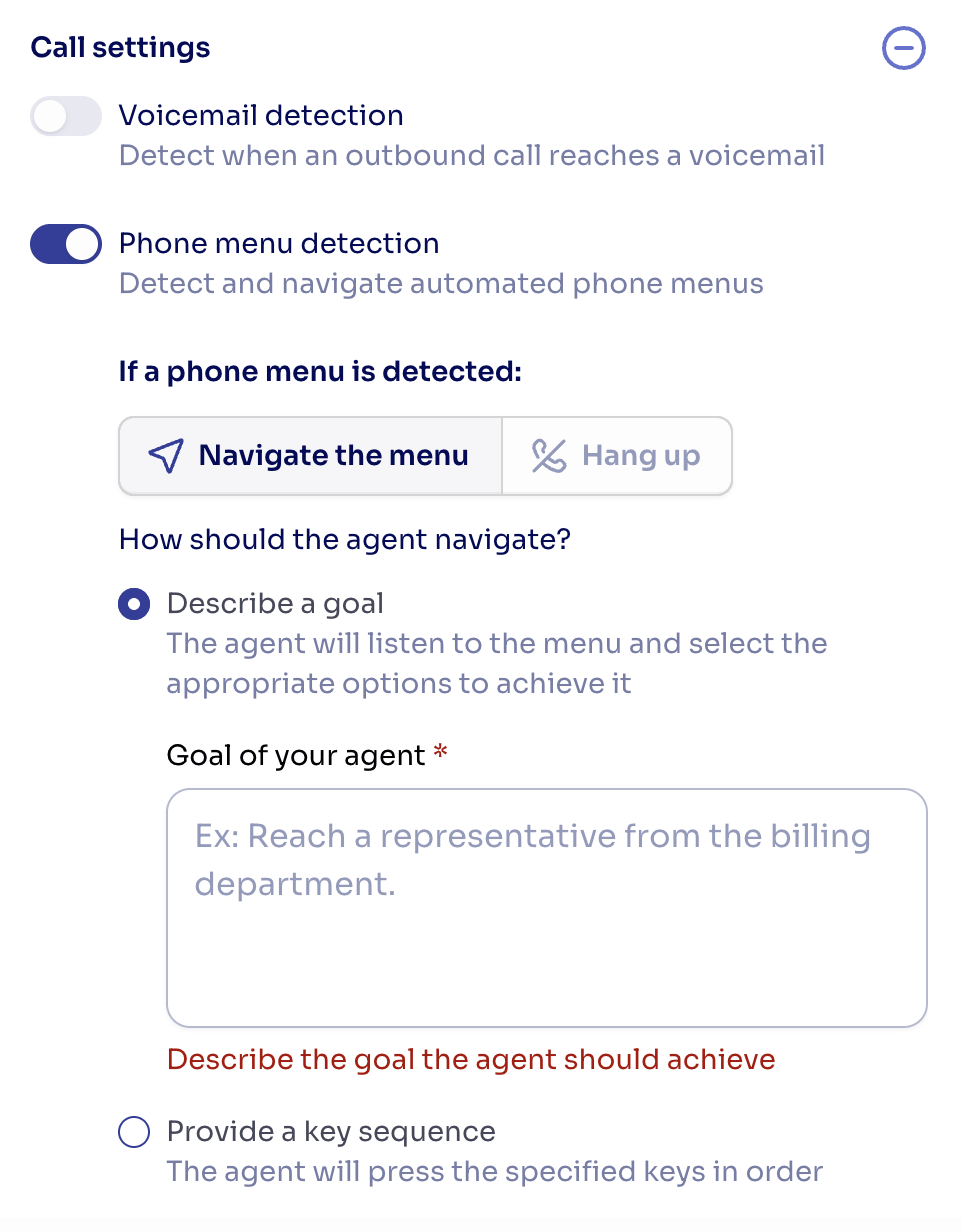
You'll find both options in the agent editor, under **Customization → Call settings**. Each detection is independent: you can enable voicemail handling, phone menu handling, or both.
 **Outbound calls only**
Detection runs when your agent places the call. Inbound calls are not affected by these settings.
## How detection works
At pickup, the agent listens briefly and classifies the answer as a **person**, a **voicemail**, a **phone menu**, or an **unavailable line** (carrier messages like "the phone is switched off or out of coverage").
* **Person** — the conversation starts normally: the agent says its greeting if configured, or responds to whatever the person says.
* **Voicemail / phone menu** — the agent applies the corresponding configuration described below.
* **Unavailable line** — the call ends with the `mailbox_unavailable` end reason ("Voicemail mailbox unavailable" in the call logs).
* **Uncertain** — the agent gives the benefit of the doubt and treats the answer as a person. It will never hang up on a quiet human.
Classification is highly reliable, but not perfect: there are edge cases worth knowing before you enable it. They are covered in [Good practices and limitations](#good-practices-and-limitations).
**Answered time is billed time**
The call counts as answered from pickup, whoever — or whatever — picks up. Detection, voicemail messages and menu navigation all consume call minutes, and the recording covers them from the start.
## Voicemail detection
When the call lands on an answering machine, the agent applies the action you choose:
* **Leave a message** — the agent speaks your message onto the voicemail and hangs up. The call ends with the `voicemail_left` end reason ("Voicemail message left" in the call logs). The message supports [dynamic variables](/en/build/agents/dynamic-variables), so you can personalize it per call:
> Hola {{client_name}}, te llamaba de {{company}}. Cuando puedas, devuélveme la llamada.
* **Hang up** — the agent ends the call immediately. The call ends with the `answering_machine_detected` end reason.
If you pick **Leave a message**, the message text is required — the editor flags it as an issue and the agent can't be published until you write it.
## Phone menu detection
When the call lands on an automated menu ("Para hablar con ventas, pulse uno…"), the agent can **navigate it** by pressing keys, or simply **hang up**.
### Navigation by goal
Describe in plain language who or what the agent should reach, and it will listen to each menu, pick the most promising option, and press the corresponding key — across as many menu levels as needed. The goal supports [dynamic variables](/en/build/agents/dynamic-variables).
Writing good goals:
* Name the person or department: *"Reach Juan Luis, from the officials department"* works better than *"talk to someone"*.
* If the menu doesn't offer the person you named, the agent presses toward whoever is most likely to be human — an operator, reception — since a person can redirect the call.
* The agent only gives up when the menu clearly cannot lead to any human (an informational dead end, or a menu loop with no human option).
### Navigation by key sequence
If you already know the path ("press 1, then 3"), provide the exact keys (`0-9`, `*`, `#`, comma-separated, e.g. `1,3`). The agent presses one key per menu prompt. If the menus continue after your sequence runs out, the agent keeps navigating on its own toward a human.
### While it navigates
* Selection confirmations, ringing, hold music and "all our agents are busy" messages are understood as **progress in flight**: the agent waits through them, tolerating around 90 seconds of queue after each keypress before concluding nobody will answer. The whole navigation is capped at a few minutes.
* The moment a **person** answers, the agent starts the conversation — your greeting if configured, or a natural opener.
* If the selected extension rolls over to a **personal voicemail**, the agent does not leave a message there; the call ends as `ivr_no_answer`.
### Navigation outcomes
| End reason | Meaning | Retry? |
| ------------------------------------------------------ | --------------------------------------------------------------------------------- | ----------------------------- |
| — (conversation) | A person answered and the agent talked to them | — |
| `ivr_no_answer` ("No answer after the phone menu") | The menu was navigated correctly, but nobody picked up where the agent was routed | Yes — try another time of day |
| `ivr_unreachable` ("Couldn't navigate the phone menu") | The menu could not lead to a person (dead end, loop) | Review the goal or the number |
## What you'll see in logs and recordings
Every step of the process is visible in the [call logs](/en/deployment/call-logs): what the agent heard when the call was answered, the goal it pursued, each menu it listened to, **which key it pressed and why**, and how the navigation ended. The recording covers the full call from pickup, including menus, hold time and any voicemail message left.
## Good practices and limitations
* **Give the agent an outbound mission in its prompt.** After navigating a menu, a real person will pick up — if the prompt doesn't say why the agent is calling, the conversation will go nowhere.
* **Detection takes a few seconds and is not infallible.** A machine locution that opens with a short, human-like phrase can occasionally be classified as a person; the agent then simply behaves as in a normal conversation, which is the safe failure mode.
* **Voice-driven systems are not fully supported yet.** The agent navigates menus with key presses only. When a system asks it to *speak* — voice-driven IVRs ("say the reason for your call") or call-screening assistants that record your name before passing you through — the agent treats it as reaching a person and hands the conversation to the voice model, which introduces itself. That often gets through screeners, but strict voice menus may not understand it and route to an operator (or hang up). If voice-driven menu support matters to you, [contact us](mailto:support@diga.io).
**Coming from the "Detect answering machine" call tool?**
That tool has been replaced by this configuration. Agents that had it assigned were automatically migrated to both detections enabled with the **Hang up** action — review their Call settings if you want a different behavior.
## API
The same configuration is available on the agent API as flat fields:
```json theme={null}
{
"voicemail_detection": true,
"voicemail_action": "leave_message",
"voicemail_message": "Hola {{client_name}}, te llamaba de {{company}}. Cuando puedas, devuélveme la llamada.",
"phone_menu_detection": true,
"phone_menu_action": "navigate",
"phone_menu_navigation_mode": "goal",
"phone_menu_goal": "Reach {{contact_name}} from the sales department"
}
```
See the [API reference](/api-reference) for field details and validation rules.
**Outbound calls only**
Detection runs when your agent places the call. Inbound calls are not affected by these settings.
## How detection works
At pickup, the agent listens briefly and classifies the answer as a **person**, a **voicemail**, a **phone menu**, or an **unavailable line** (carrier messages like "the phone is switched off or out of coverage").
* **Person** — the conversation starts normally: the agent says its greeting if configured, or responds to whatever the person says.
* **Voicemail / phone menu** — the agent applies the corresponding configuration described below.
* **Unavailable line** — the call ends with the `mailbox_unavailable` end reason ("Voicemail mailbox unavailable" in the call logs).
* **Uncertain** — the agent gives the benefit of the doubt and treats the answer as a person. It will never hang up on a quiet human.
Classification is highly reliable, but not perfect: there are edge cases worth knowing before you enable it. They are covered in [Good practices and limitations](#good-practices-and-limitations).
**Answered time is billed time**
The call counts as answered from pickup, whoever — or whatever — picks up. Detection, voicemail messages and menu navigation all consume call minutes, and the recording covers them from the start.
## Voicemail detection
When the call lands on an answering machine, the agent applies the action you choose:
* **Leave a message** — the agent speaks your message onto the voicemail and hangs up. The call ends with the `voicemail_left` end reason ("Voicemail message left" in the call logs). The message supports [dynamic variables](/en/build/agents/dynamic-variables), so you can personalize it per call:
> Hola {{client_name}}, te llamaba de {{company}}. Cuando puedas, devuélveme la llamada.
* **Hang up** — the agent ends the call immediately. The call ends with the `answering_machine_detected` end reason.
If you pick **Leave a message**, the message text is required — the editor flags it as an issue and the agent can't be published until you write it.
## Phone menu detection
When the call lands on an automated menu ("Para hablar con ventas, pulse uno…"), the agent can **navigate it** by pressing keys, or simply **hang up**.
### Navigation by goal
Describe in plain language who or what the agent should reach, and it will listen to each menu, pick the most promising option, and press the corresponding key — across as many menu levels as needed. The goal supports [dynamic variables](/en/build/agents/dynamic-variables).
Writing good goals:
* Name the person or department: *"Reach Juan Luis, from the officials department"* works better than *"talk to someone"*.
* If the menu doesn't offer the person you named, the agent presses toward whoever is most likely to be human — an operator, reception — since a person can redirect the call.
* The agent only gives up when the menu clearly cannot lead to any human (an informational dead end, or a menu loop with no human option).
### Navigation by key sequence
If you already know the path ("press 1, then 3"), provide the exact keys (`0-9`, `*`, `#`, comma-separated, e.g. `1,3`). The agent presses one key per menu prompt. If the menus continue after your sequence runs out, the agent keeps navigating on its own toward a human.
### While it navigates
* Selection confirmations, ringing, hold music and "all our agents are busy" messages are understood as **progress in flight**: the agent waits through them, tolerating around 90 seconds of queue after each keypress before concluding nobody will answer. The whole navigation is capped at a few minutes.
* The moment a **person** answers, the agent starts the conversation — your greeting if configured, or a natural opener.
* If the selected extension rolls over to a **personal voicemail**, the agent does not leave a message there; the call ends as `ivr_no_answer`.
### Navigation outcomes
| End reason | Meaning | Retry? |
| ------------------------------------------------------ | --------------------------------------------------------------------------------- | ----------------------------- |
| — (conversation) | A person answered and the agent talked to them | — |
| `ivr_no_answer` ("No answer after the phone menu") | The menu was navigated correctly, but nobody picked up where the agent was routed | Yes — try another time of day |
| `ivr_unreachable` ("Couldn't navigate the phone menu") | The menu could not lead to a person (dead end, loop) | Review the goal or the number |
## What you'll see in logs and recordings
Every step of the process is visible in the [call logs](/en/deployment/call-logs): what the agent heard when the call was answered, the goal it pursued, each menu it listened to, **which key it pressed and why**, and how the navigation ended. The recording covers the full call from pickup, including menus, hold time and any voicemail message left.
## Good practices and limitations
* **Give the agent an outbound mission in its prompt.** After navigating a menu, a real person will pick up — if the prompt doesn't say why the agent is calling, the conversation will go nowhere.
* **Detection takes a few seconds and is not infallible.** A machine locution that opens with a short, human-like phrase can occasionally be classified as a person; the agent then simply behaves as in a normal conversation, which is the safe failure mode.
* **Voice-driven systems are not fully supported yet.** The agent navigates menus with key presses only. When a system asks it to *speak* — voice-driven IVRs ("say the reason for your call") or call-screening assistants that record your name before passing you through — the agent treats it as reaching a person and hands the conversation to the voice model, which introduces itself. That often gets through screeners, but strict voice menus may not understand it and route to an operator (or hang up). If voice-driven menu support matters to you, [contact us](mailto:support@diga.io).
**Coming from the "Detect answering machine" call tool?**
That tool has been replaced by this configuration. Agents that had it assigned were automatically migrated to both detections enabled with the **Hang up** action — review their Call settings if you want a different behavior.
## API
The same configuration is available on the agent API as flat fields:
```json theme={null}
{
"voicemail_detection": true,
"voicemail_action": "leave_message",
"voicemail_message": "Hola {{client_name}}, te llamaba de {{company}}. Cuando puedas, devuélveme la llamada.",
"phone_menu_detection": true,
"phone_menu_action": "navigate",
"phone_menu_navigation_mode": "goal",
"phone_menu_goal": "Reach {{contact_name}} from the sales department"
}
```
See the [API reference](/api-reference) for field details and validation rules.