> ## Documentation Index
> Fetch the complete documentation index at: https://docs.diga.io/llms.txt
> Use this file to discover all available pages before exploring further.
# How it Works
> Build phone agents with structured flows using nodes and transitions for complex call scenarios
## What is a Conversational Path Agent?
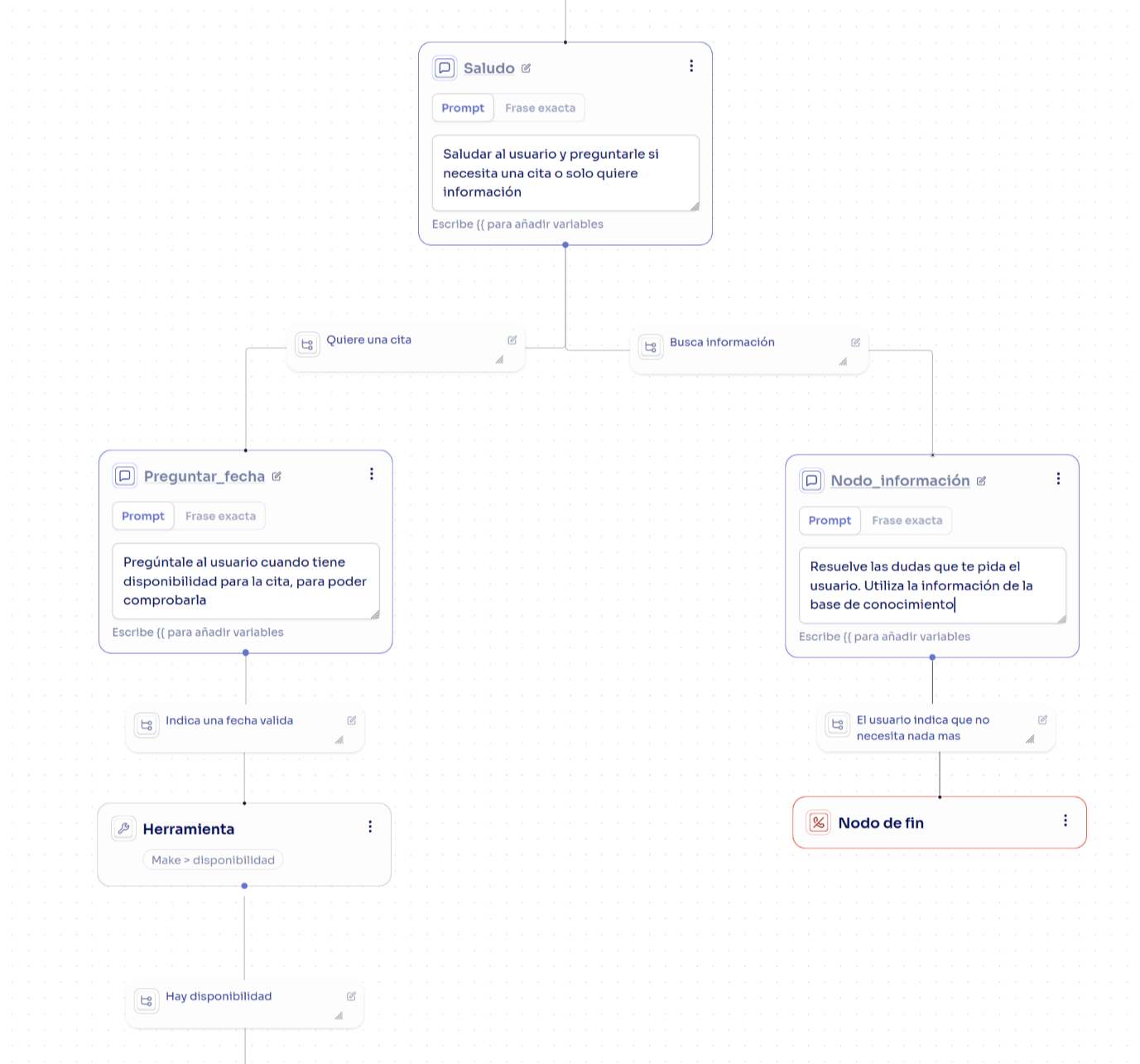
Conversational path agents allow you to create multiple nodes to handle different scenarios in conversations. This approach provides more granular control over conversation flow compared to single prompt agents, enabling you to handle more complex scenarios with predictable outcomes.
**When to use Conversational Paths?**
This architecture is ideal when you need:
* Precise control over conversation flow
* Execute tools at specific moments
* Handle multiple scenarios with conditional logic
* 100% predictable and auditable behavior
* Transfer calls based on context
For simpler cases, consider using Single Prompt Agents
### Main Advantages
Give your agent instructions on how to respond at specific points in the conversation
Call your APIs and webhooks in specific nodes
Supports multiple conditions and conversation routes
Add contextual information in specific nodes to improve responses
 ## Fundamental Components
### Global Prompt
The global prompt is a set of instructions that apply to the entire conversation. It defines the tone, style, and general behavior of the agent.
### Nodes
Nodes are the basic units of the conversational flow. Each node defines a small set of logic for a specific moment in the conversation.
**Available node types:**
* Start Node
* Conversation Node
* Tool Node
* End Node
* Transfer Node
Learn how to use each node type in detail
### Transitions
Transitions are the connections between nodes that define how the agent navigates through the conversational flow. Each transition specifies:
* **When** the agent should move from one node to another
* **What conditions** must be met for the transition to occur
* **What the next destination node** is
## How it Works
The agent always starts at the first node of your flow. From there, it moves between nodes according to the labels you define in each transition, executing each node's instructions as part of the generated dialogue.
### Navigation Between Nodes
Decisions about which path to take are based on two key elements:
1. **Transition conditions**: Describe when each route should be activated. Conditions allow the agent to remain in a node until a specific requirement is met. If the condition isn't satisfied, the agent won't advance and will continue requesting the necessary information.
2. **Node instructions**: Define what the agent should say or do at that point
**Practical example:**
In a node called "Request reservation information", the agent asks the user for the date, time, and number of guests. Depending on the user's response, the agent evaluates the transition labels:
* If the number of guests is **less than 8** → advance to the "Process reservation" node
* If the number of guests is **greater than 8** → advance to the "Transfer call" node
The agent executes the new node's instructions and continues navigating through the flow until the call is complete.
## Global Nodes
In a conversational flow, there are scenarios that can arise at any moment during the call and aren't linked to a specific node. For example, the user might say *"I don't have time now"* or *"I need to call later"* at any point in the conversation, and you'd want to handle these situations consistently regardless of where they occur.
For these cases, you can configure **global nodes**. Any type of node can become a global node by marking it as such in its configuration.
### Configuring a Global Node
When you define a node as global, you must specify the condition that will trigger the transition to that node. This condition acts as a universal trigger that's evaluated from any point in the flow.
**Example:**
Imagine you configure a global node with the condition:
> "When the user indicates it's not a good time to talk"
Now, regardless of where in the call the agent is, if the user says something like *"I don't have time"* or *"Can I call later?"*, the agent will automatically transition to this global node to handle the situation.
**Important feature:**
Global nodes don't need to be visually connected to the rest of the flow in your diagram, as they can be reached from any node by default.
### Return to Main Flow
Depending on the context, the agent can return to the main flow after handling the situation in the global node. You can also define specific transitions from the global node to other particular nodes in the flow.
## Best Practices
Never leave a node without an escape route. If the user says something unexpected, the agent must know what to do.
```
❌ Bad:
Transitions:
├─ "user accepts" → Next node
└─ (nothing else)
✅ Good:
Transitions:
├─ "user accepts" → Next node
├─ "user declines" → Alternative node
└─ Default → Clarify response
```
If two conditions can be met simultaneously, the behavior will be unpredictable.
```
❌ Bad:
├─ "user mentions price" → Pricing Node
└─ "user asks something" → FAQ Node
✅ Good:
├─ "user specifically asks about prices or costs" → Pricing Node
├─ "user asks about features or functionality" → Features Node
└─ "other general question" → FAQ Node
```
The node name should clearly indicate its purpose.
```
❌ Bad:
- Node 1
- Next step
- Check
✅ Good:
- Request reservation date
- Verify availability via API
- Confirm data with user
```
A node should do one thing well. If it has many transitions, you probably need to split it.
```
❌ One node with 8+ different transitions
✅ Split into intermediate classification nodes
Example:
Bad design:
"Handle everything" → 8 different paths
Good design:
"Classify type" → 3 categories
├─ "Category A" → 2-3 specific paths
├─ "Category B" → 2-3 specific paths
└─ "Category C" → 2-3 specific paths
```
## Next Steps
Learn how to use each node type in detail
Define conditions to control conversation flow
Adjust voice, speed, language, and advanced parameters
Manage multiple versions of your conversational paths
## Fundamental Components
### Global Prompt
The global prompt is a set of instructions that apply to the entire conversation. It defines the tone, style, and general behavior of the agent.
### Nodes
Nodes are the basic units of the conversational flow. Each node defines a small set of logic for a specific moment in the conversation.
**Available node types:**
* Start Node
* Conversation Node
* Tool Node
* End Node
* Transfer Node
Learn how to use each node type in detail
### Transitions
Transitions are the connections between nodes that define how the agent navigates through the conversational flow. Each transition specifies:
* **When** the agent should move from one node to another
* **What conditions** must be met for the transition to occur
* **What the next destination node** is
## How it Works
The agent always starts at the first node of your flow. From there, it moves between nodes according to the labels you define in each transition, executing each node's instructions as part of the generated dialogue.
### Navigation Between Nodes
Decisions about which path to take are based on two key elements:
1. **Transition conditions**: Describe when each route should be activated. Conditions allow the agent to remain in a node until a specific requirement is met. If the condition isn't satisfied, the agent won't advance and will continue requesting the necessary information.
2. **Node instructions**: Define what the agent should say or do at that point
**Practical example:**
In a node called "Request reservation information", the agent asks the user for the date, time, and number of guests. Depending on the user's response, the agent evaluates the transition labels:
* If the number of guests is **less than 8** → advance to the "Process reservation" node
* If the number of guests is **greater than 8** → advance to the "Transfer call" node
The agent executes the new node's instructions and continues navigating through the flow until the call is complete.
## Global Nodes
In a conversational flow, there are scenarios that can arise at any moment during the call and aren't linked to a specific node. For example, the user might say *"I don't have time now"* or *"I need to call later"* at any point in the conversation, and you'd want to handle these situations consistently regardless of where they occur.
For these cases, you can configure **global nodes**. Any type of node can become a global node by marking it as such in its configuration.
### Configuring a Global Node
When you define a node as global, you must specify the condition that will trigger the transition to that node. This condition acts as a universal trigger that's evaluated from any point in the flow.
**Example:**
Imagine you configure a global node with the condition:
> "When the user indicates it's not a good time to talk"
Now, regardless of where in the call the agent is, if the user says something like *"I don't have time"* or *"Can I call later?"*, the agent will automatically transition to this global node to handle the situation.
**Important feature:**
Global nodes don't need to be visually connected to the rest of the flow in your diagram, as they can be reached from any node by default.
### Return to Main Flow
Depending on the context, the agent can return to the main flow after handling the situation in the global node. You can also define specific transitions from the global node to other particular nodes in the flow.
## Best Practices
Never leave a node without an escape route. If the user says something unexpected, the agent must know what to do.
```
❌ Bad:
Transitions:
├─ "user accepts" → Next node
└─ (nothing else)
✅ Good:
Transitions:
├─ "user accepts" → Next node
├─ "user declines" → Alternative node
└─ Default → Clarify response
```
If two conditions can be met simultaneously, the behavior will be unpredictable.
```
❌ Bad:
├─ "user mentions price" → Pricing Node
└─ "user asks something" → FAQ Node
✅ Good:
├─ "user specifically asks about prices or costs" → Pricing Node
├─ "user asks about features or functionality" → Features Node
└─ "other general question" → FAQ Node
```
The node name should clearly indicate its purpose.
```
❌ Bad:
- Node 1
- Next step
- Check
✅ Good:
- Request reservation date
- Verify availability via API
- Confirm data with user
```
A node should do one thing well. If it has many transitions, you probably need to split it.
```
❌ One node with 8+ different transitions
✅ Split into intermediate classification nodes
Example:
Bad design:
"Handle everything" → 8 different paths
Good design:
"Classify type" → 3 categories
├─ "Category A" → 2-3 specific paths
├─ "Category B" → 2-3 specific paths
└─ "Category C" → 2-3 specific paths
```
## Next Steps
Learn how to use each node type in detail
Define conditions to control conversation flow
Adjust voice, speed, language, and advanced parameters
Manage multiple versions of your conversational paths